Written
by
: Ataya P
Date : 31 March 2007
Introduction
Hi !! everyone who has interest in Embedded Systems Technology.I 'm just a newbie around here but I really want to share my experiences that I just found out by my DIY testing. Please don't blame me if you burning something wrong with my suggestion here. Ha ha *\(^_^)/*
Before cooking
Ok.First of all. We need some ingredients fo
- Hardware
PC : my PC is desknote VIA cpu 500 MHz RAM 256MByte
Window 2000 --little bit slow.( I prefer to use Linux but
I can't run ISE(with JTAG support) on that OS. That's pity (ToT) )
FPGA board : I use FPGA discovery-III XC3S200 from
Ailogic technology Thailand with has
Spartan-III 200,000 gates and JTAG cable for
downloading BIT file.
- Software
ISE version 6 up for building VHDL Picoblaze code.
pBlazeIDE for making assembly code runing on Picoblaze.
Picoblaze sourcecode for usingNow<Spartan-III (download freely from Xilinx website)
Making time
After installed all softwares that we need. Just open ISE and create a new project name Picoblaze (you can use any name that you want) then copy picoblaze VHDL source code that you download from Xilinx website to the project directory then add all VHDL files to ISE project source. ISE will show file association and you will know that we still need prog_rom component
Ok.What is prog_rom component ? It is a ROM code for executed picoblaze mpu. This component can generated by 2 ways (As I know) First, using Xilinx assembler that attach with picoblaze VHDL source code by writing PSM code (assembly code for picoblaze) and assembly it. the Other way is using pBlazeIDE (the easy way for me) to writting PSM file and assembly it. Anyway the format of PSM in pBlazeIDE and Xilinx assembler is not the same format. You should be careful about this.
So,Just making PSM source code with pBlazeIDE and generated .VHDL file that contain the ROM code for running on picoblaze. Afterthat just copy VHDL file to the ISE project directory and add it to the project source directory.
Now just fix the source of embedded_kcpsm3.vhd to point at your ROM file by changing of ...
component prog_rom
Port (
end component;
.....
program: prog_rom
port map(
to be like this ...
component ROM
Port (
end component;
......
program: ROM
port map(
That is . "ROM" is the name of your entity that is in the ROM code you just generated from pBlazeIDE. So, If you use the other name. Please change to fit with it too.
Now we have to change somethings in the picoblaze VHDL code because of my FPGA board's pins aren't designed for I/O with picoblaze. The interrupt pin and reset pin are inverted.That why I have to assign NOT gate by myself.
processor: kcpsm3
port map(
Alright now we ready to rumble !!! after assign package pins . Try to synthesis and generate programing file. if everything is alright. you will be able to burn BIT file in to the FPGA board without problem. Is that easy ? (>.<)***
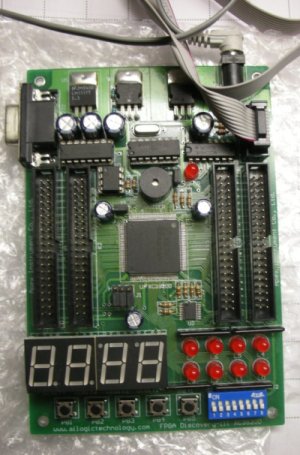
Pic 1 : Spartan-III FPGA board
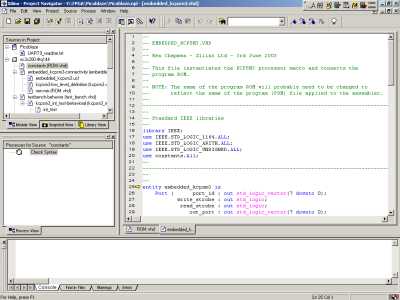
Pic 2 : ISE 6.3.03i
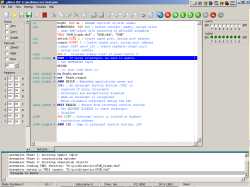
Pic 3 : pBlazeIDE 3.7.4

Pic 4 : Download Bit file with Impact
File and Source code :
>>
test.psm <<
: psm file for push switch and led is on
>> embedded_kcpsm3.ucf <<: pin assignment file of ISE
*** due to software license . the others files you should download from the original website by yourself.
Useful links :
Picoblaze project
http://www.xilinx.com/
for picoblaze sourcecode
http://www.mediatronix.com/pBl
for download pBlazeIDE
Date : 31 March 2007
Introduction
Hi !! everyone who has interest in Embedded Systems Technology.I 'm just a newbie around here but I really want to share my experiences that I just found out by my DIY testing. Please don't blame me if you burning something wrong with my suggestion here. Ha ha *\(^_^)/*
Before cooking
Ok.First of all. We need some ingredients fo
- Hardware
PC : my PC is desknote VIA cpu 500 MHz RAM 256MByte
Window 2000 --little bit slow.( I prefer to use Linux but
I can't run ISE(with JTAG support) on that OS. That's pity (ToT) )
FPGA board : I use FPGA discovery-III XC3S200 from
Ailogic technology Thailand with has
Spartan-III 200,000 gates and JTAG cable for
downloading BIT file.
- Software
ISE version 6 up for building VHDL Picoblaze code.
pBlazeIDE for making assembly code runing on Picoblaze.
Picoblaze sourcecode for usingNow<Spartan-III (download freely from Xilinx website)
Making time
After installed all softwares that we need. Just open ISE and create a new project name Picoblaze (you can use any name that you want) then copy picoblaze VHDL source code that you download from Xilinx website to the project directory then add all VHDL files to ISE project source. ISE will show file association and you will know that we still need prog_rom component
Ok.What is prog_rom component ? It is a ROM code for executed picoblaze mpu. This component can generated by 2 ways (As I know) First, using Xilinx assembler that attach with picoblaze VHDL source code by writing PSM code (assembly code for picoblaze) and assembly it. the Other way is using pBlazeIDE (the easy way for me) to writting PSM file and assembly it. Anyway the format of PSM in pBlazeIDE and Xilinx assembler is not the same format. You should be careful about this.
So,Just making PSM source code with pBlazeIDE and generated .VHDL file that contain the ROM code for running on picoblaze. Afterthat just copy VHDL file to the ISE project directory and add it to the project source directory.
Now just fix the source of embedded_kcpsm3.vhd to point at your ROM file by changing of ...
component prog_rom
Port (
end component;
.....
program: prog_rom
port map(
to be like this ...
component ROM
Port (
end component;
......
program: ROM
port map(
That is . "ROM" is the name of your entity that is in the ROM code you just generated from pBlazeIDE. So, If you use the other name. Please change to fit with it too.
Now we have to change somethings in the picoblaze VHDL code because of my FPGA board's pins aren't designed for I/O with picoblaze. The interrupt pin and reset pin are inverted.That why I have to assign NOT gate by myself.
processor: kcpsm3
port map(
Alright now we ready to rumble !!! after assign package pins . Try to synthesis and generate programing file. if everything is alright. you will be able to burn BIT file in to the FPGA board without problem. Is that easy ? (>.<)***
Pic 1 : Spartan-III FPGA board
Pic 2 : ISE 6.3.03i
Pic 3 : pBlazeIDE 3.7.4
Pic 4 : Download Bit file with Impact
File and Source code :
>> embedded_kcpsm3.ucf <<: pin assignment file of ISE
*** due to software license . the others files you should download from the original website by yourself.
Useful links :
Picoblaze project
http://www.xilinx.com/
for picoblaze sourcecode
http://www.mediatronix.com/pBl
for download pBlazeIDE
- ataya_p's blog
- Login to post comments

Custom Search
 English
 日本語
日本語 ภาษาไทย