Date
: Sat,2 Fabuary 2013
Writer : Ataya P
Working Platform :
Lenovo Notebook , Intel Pentium Dual Core T2080 1.73GHz
2Gbyte RAM
Ubuntu 12.04.1 LTS- Precise Pangolin
Software:
- Eclipse (For my case, Eclipse Indigo)
- Android SDK installed
Hardware :
Your Android Phone ( For my case, Galaxy Nexus) connect via usb cable with your PC.
Let's do it
1. Run Eclipse. Open Help-> Eclipse MarketPlace and search for PyDev then install it.

2.When finished install, Go to Window->Preferences->

3.Create new PyDev project.

4.Select project type as Jython, grammar version 2.5 and click finish button.

5.Add your test script and folder for saving capture screens

6.Open external tools configurations and add new configuration as below...
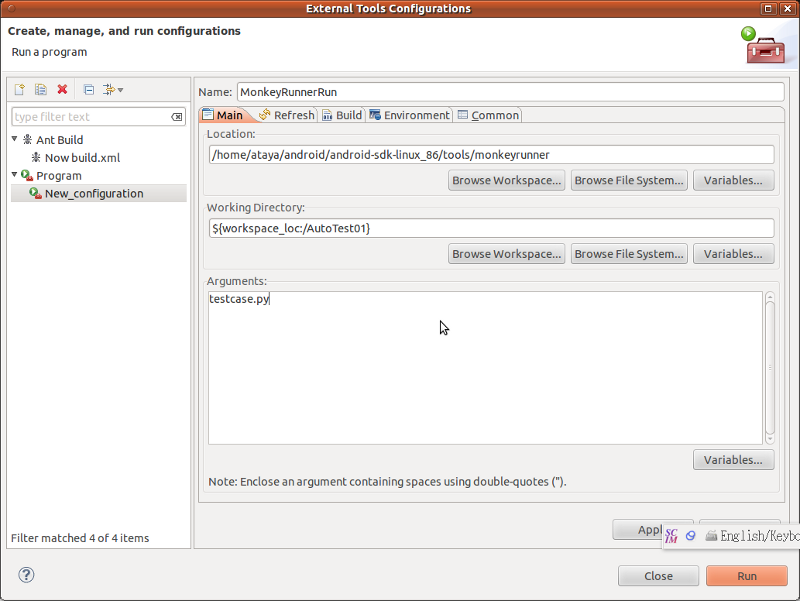
7.Click on Run External Tools button and run the test script the phone should show the app and the screep capture stored inside the folder.

Useful Link :
About Monkey Runner ->
http://developer.android.com/t


Writer : Ataya P
Working Platform :
Lenovo Notebook , Intel Pentium Dual Core T2080 1.73GHz
2Gbyte RAM
Ubuntu 12.04.1 LTS- Precise Pangolin
Software:
- Eclipse (For my case, Eclipse Indigo)
- Android SDK installed
Hardware :
Your Android Phone ( For my case, Galaxy Nexus) connect via usb cable with your PC.
Now I tried to using MonkeyRunner for automatic application testing that working on Android phone. It's free and comes with the Android SDK itself. The working script was writen in Python(using Jython interpreter) I successfully setting the development environment on the Eclipse IDE … and I will show you how to do that.
Let's do it
1. Run Eclipse. Open Help-> Eclipse MarketPlace and search for PyDev then install it.
2.When finished install, Go to Window->Preferences->
3.Create new PyDev project.
4.Select project type as Jython, grammar version 2.5 and click finish button.
5.Add your test script and folder for saving capture screens
6.Open external tools configurations and add new configuration as below...
7.Click on Run External Tools button and run the test script the phone should show the app and the screep capture stored inside the folder.
Useful Link :
About Monkey Runner ->
http://developer.android.com/t
- ataya_p's blog
- Login to post comments
Custom Search
 English
 日本語
日本語 ภาษาไทย
Most Popular
Last viewed: