Comic
Fay's Diary Comic
Kanji Transformer Series
Our Android Apps
Paper Toy
Animation
Dharma Cartoon
Figure Photo Collection
Flash Game
Embedded Systems
Old Work
Toy & Gadget
Game & Software
About Us
Links
Ataya's Embedded Systems Blog
Green Tea Story
Play with BeagleBoneBlack
Studio Wallpaper
Studio Wallpaper
The Sky Flower & The Temple Dog
Date : Saturday,7 March 2015
Writer : Ataya P
It's time to make some project for testing on MachXO2 7000HE Breakout Board. Let's begin with something simple like a count up counter. Let's see...
Working Platform :
Lenovo Notebook , Intel Pentium Dual Core T2080 1.73GHz
2Gbyte RAM
Ubuntu Ubuntu 12.04.3 LTS
Let's do it
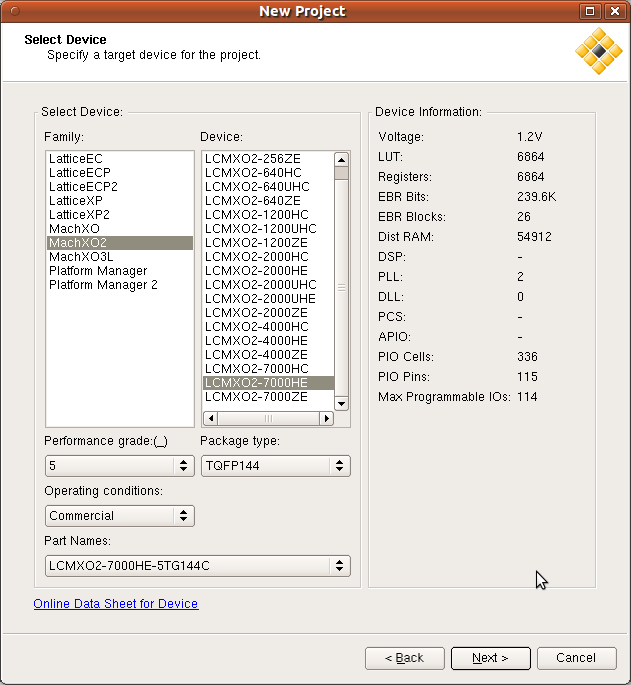
1.Start Diamond and make new project.

2.Make new VHDL file and write VHDL code for the counter.

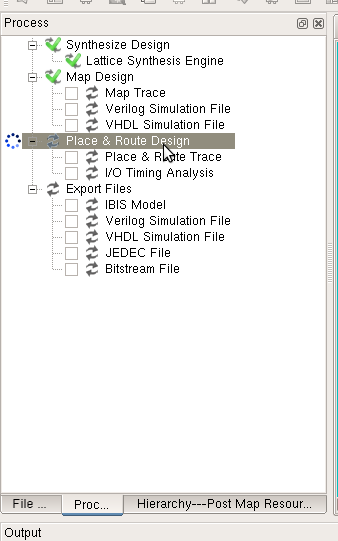
3.Click on Process tab then right click on "Place and Route Design" and select Run.
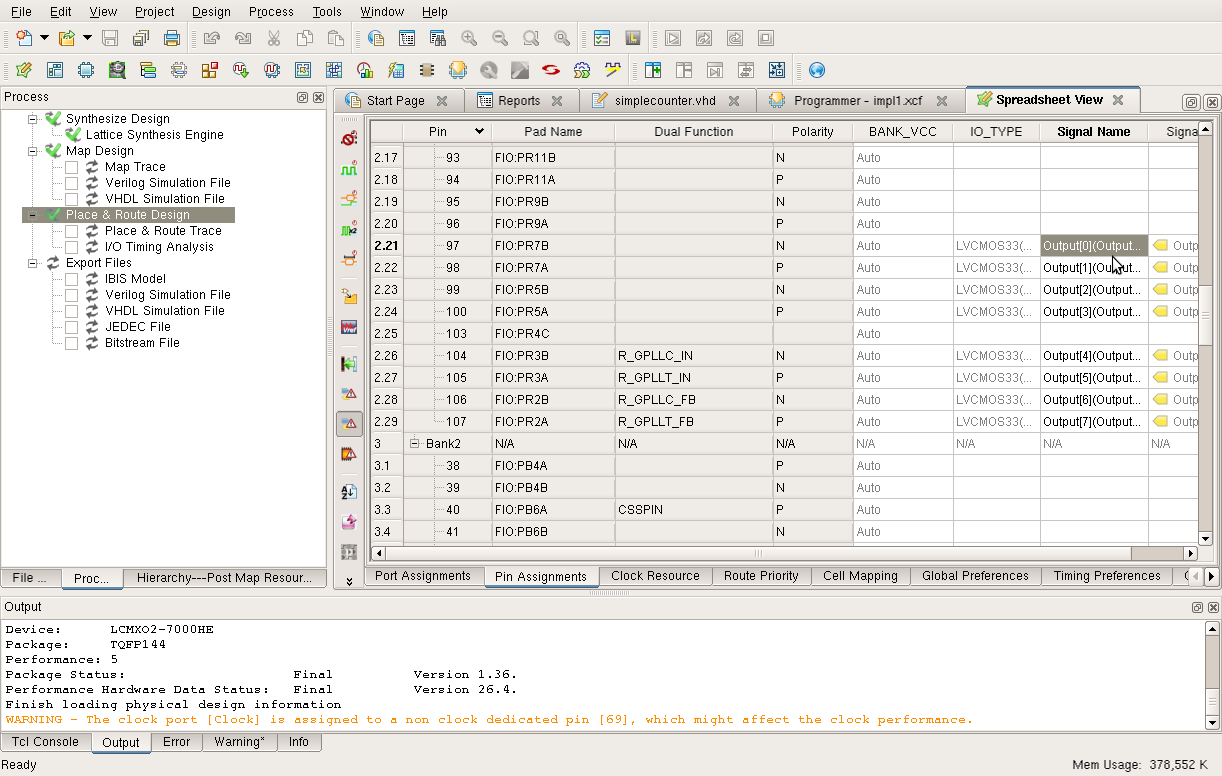
4.Next, Select on Spreadsheet tool and assign pins for the design.
set Clock for pin 69
set Output[0] for pin 97
set Output[1] for pin 98
set Output[2] for pin 99
set Output[3] for pin 100
set Output[4] for pin 104
set Output[5] for pin 105
set Output[6] for pin 106
set Output[7] for pin 107
You need to connect pin 69 to push switch that connected other side to the GND.
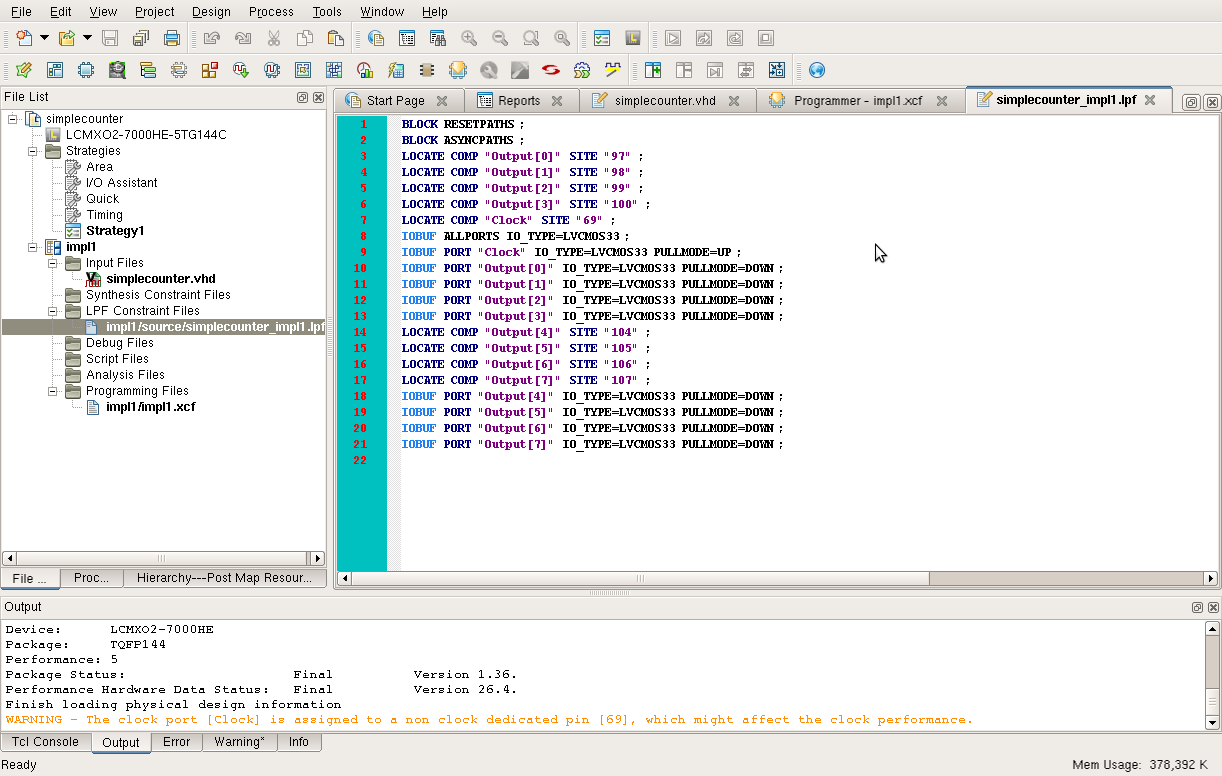
5.Save the spreadsheet and check the pins assignment at impl1/source/simplecounter_imp 1.lpf

6.On Precess tab, tick on the JEDEC file and run the process.

7. When the synthesis process was done, download the JEDEC file into the board. That is. Enjoy your simple counter.
Download sample project here
Useful Link :
Lattice website->
http://www.latticesemi.com/en. aspx
Writer : Ataya P
It's time to make some project for testing on MachXO2 7000HE Breakout Board. Let's begin with something simple like a count up counter. Let's see...
Working Platform :
Lenovo Notebook , Intel Pentium Dual Core T2080 1.73GHz
2Gbyte RAM
Ubuntu Ubuntu 12.04.3 LTS
Let's do it
1.Start Diamond and make new project.

2.Make new VHDL file and write VHDL code for the counter.

3.Click on Process tab then right click on "Place and Route Design" and select Run.

4.Next, Select on Spreadsheet tool and assign pins for the design.
set Clock for pin 69
set Output[0] for pin 97
set Output[1] for pin 98
set Output[2] for pin 99
set Output[3] for pin 100
set Output[4] for pin 104
set Output[5] for pin 105
set Output[6] for pin 106
set Output[7] for pin 107
You need to connect pin 69 to push switch that connected other side to the GND.

5.Save the spreadsheet and check the pins assignment at impl1/source/simplecounter_imp

6.On Precess tab, tick on the JEDEC file and run the process.

7. When the synthesis process was done, download the JEDEC file into the board. That is. Enjoy your simple counter.
Download sample project here
Useful Link :
Lattice website->
http://www.latticesemi.com/en.
- ataya_p's blog
- Login to post comments
Custom Search