Comic
Fay's Diary Comic
Kanji Transformer Series
Our Android Apps
Paper Toy
Animation
Dharma Cartoon
Figure Photo Collection
Flash Game
Embedded Systems
Old Work
Toy & Gadget
Game & Software
About Us
Links
Ataya's Embedded Systems Blog
Green Tea Story
Play with BeagleBoneBlack
Studio Wallpaper
Studio Wallpaper
The Sky Flower & The Temple Dog
Date
: Sun,14 August 2011
Writer : Ataya P
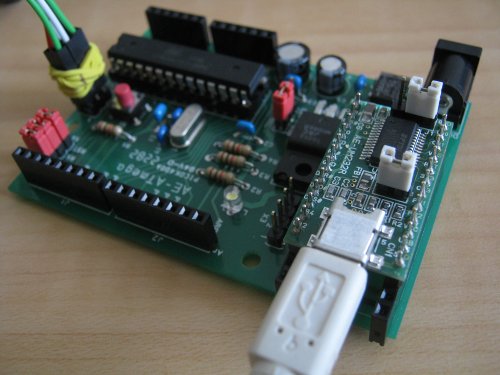
Arduino has been widely use for rapid prototyping and hobby electronic design. It is designed to use with AVR microcontroller and my board seems to be supporting it also. Here is my lab on this stuff ...

Working Platform :
Lenovo Notebook , Intel Pentium Dual Core T2080 1.73GHz
2Gbyte RAM
Ubuntu 10.04 LTS- the Lucid Lynx
Hardware :
ATMega168P development kit from Akitsuki shop at Akihabara
(ATmega168ï
http://akizukidenshi.com/catal
You may also require AVR-USBasp as a hardware programmer
http://www.aitendo.co.jp/produ
Let's do it
For using Arduino on your AVR board. You need to write Arduino's bootloader into the board first and then you can communicate with the board via Arduino program.
1. Download Arduino tool and source code at ...
http://arduino.cc/en/Main/Soft
2. Extract file and go to "hardware/arduino/bootloaders/
3. If you were already settup development environment for AVR then you can re-make hex file by ...
4. Anyway, it already has ATmegaBOOT_168_diecimila.hex file in that directory. So, Just download this file into the board.
5. Connect the board with AVR-USBasp and using this command to write the hex file into flash memory...
6. Execute Arduino program, Select [File->Examples->Basics-&
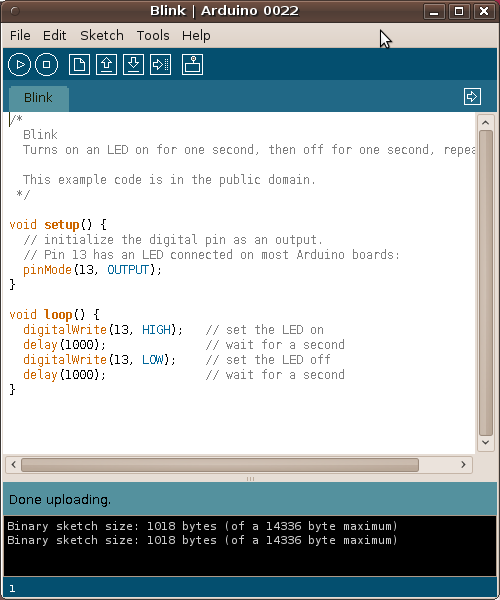
7. Select [Board -> Arduino Diecimila,Duemilanove,
8. Click on [Upload] Icon, Program will uploading to the board.
9. After downloaded, reset the board the LED must be blinking...

Useful Link :
AVR microcontroller ->
http://www.atmel.com/products/
Arduino project ->
http://arduino.cc/en/
No programer ? No problem ->
http://www.geocities.co.jp/ard


Writer : Ataya P
Arduino has been widely use for rapid prototyping and hobby electronic design. It is designed to use with AVR microcontroller and my board seems to be supporting it also. Here is my lab on this stuff ...
Working Platform :
Lenovo Notebook , Intel Pentium Dual Core T2080 1.73GHz
2Gbyte RAM
Ubuntu 10.04 LTS- the Lucid Lynx
Hardware :
ATMega168P development kit from Akitsuki shop at Akihabara
(ATmega168ï
http://akizukidenshi.com/catal
You may also require AVR-USBasp as a hardware programmer
http://www.aitendo.co.jp/produ
Let's do it
For using Arduino on your AVR board. You need to write Arduino's bootloader into the board first and then you can communicate with the board via Arduino program.
1. Download Arduino tool and source code at ...
http://arduino.cc/en/Main/Soft
2. Extract file and go to "hardware/arduino/bootloaders/
3. If you were already settup development environment for AVR then you can re-make hex file by ...
4. Anyway, it already has ATmegaBOOT_168_diecimila.hex file in that directory. So, Just download this file into the board.
5. Connect the board with AVR-USBasp and using this command to write the hex file into flash memory...
| # avrdude -cusbasp
-e -p ATMEGA168P -U flash:w:ATmegaBOOT_168_diecimi |
6. Execute Arduino program, Select [File->Examples->Basics-&
7. Select [Board -> Arduino Diecimila,Duemilanove,
8. Click on [Upload] Icon, Program will uploading to the board.
9. After downloaded, reset the board the LED must be blinking...
Useful Link :
AVR microcontroller ->
http://www.atmel.com/products/
Arduino project ->
http://arduino.cc/en/
No programer ? No problem ->
http://www.geocities.co.jp/ard
- ataya_p's blog
- Login to post comments
Custom Search
 English
 日本語
日本語 ภาษาไทย
Most Popular